Technical Glossary
VECTOR IMAGES: Vector Images are made from points, lines and paths to create
either simple images or complicated pieces of work. Since they are not
comprised of pixels (like raster graphics) you can scale the whole image up
without losing any image quality. Vector images can be used for logos and
things similar to logos as they range from size when on business cards or on
billboard so the vector will not lose quality when blown up to a larger size,
if you were to use raster graphics for a billboard logo the logo will look
pixelated and it wouldn’t look sleek and clean as it could.
RASTER IMAGES: Raster Images are made up of pixels unlike Vector Images; the
collection of pixels is called a bitmap. This type of image produces large file
sizes as there are a lot of pixels. Although the file size is large there are
file types that compress the file size to something more manageable. Raster
Images can be scaled down and there won’t be much quality lost but Raster
Images can’t be blown up due to the image become very pixelated.
THE PIXEL: The pixel in a raster image is a single little point in the image
that can be only one colour, even though a pixel can only be a single colour
there are so many pixels that you can see a single pixel and lots of them blend
together to create a smooth looking image. Pixel stands for Picture Element.
COLOUR DEPTH: The Colour depth is the amount of bits that represent colour in a
single pixel. The higher the Bit per Pixel the higher the colour variety and
quality.
 (5)
(5)
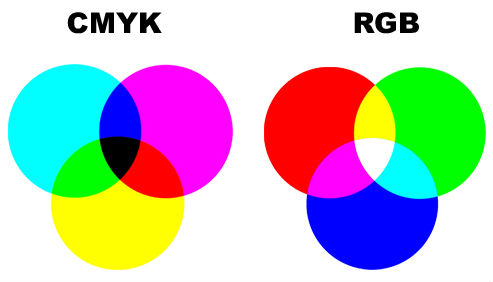
COLOUR MODELS: A Colour Model is a simple way to define colours; this determines
what colour appears on the computer screen. The 2 most common Colour Models are
CMYK (Cyan Magenta Yellow Black) and RGB (Red Green Blue). CMYK is used for
printing and RGB is used for displays/screens.
 (4)
(4)
RESOLUTION: Image Resolution is the amount of pixels a Raster image holds, the
higher the pixels the higher the image detail, An image that is 2048 pixels in width and 1536 pixels in
height has a total of 2048×1536 = 3,145,728 pixels or 3.1 megapixels. Mega
pixel just means million and it is rounded to the nearest decimal.
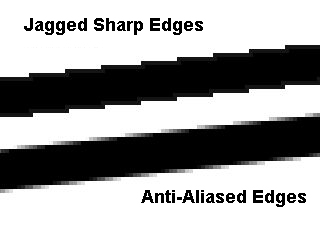
ANTI-ALIASING: Anti-Aliasing makes the jagged appearance of images/video much
smoother. The surrounding pixels of the jagged edge become similar colours to
the line to try and smooth it out. This is used in video games to enhance the
look of certain things to make it seem smoother.
 (3)
(3)
ASPECT RATIO: The Aspect ratio refers to the ratio of the width to the height of
the image/screen. Every screen has an aspect ratio; the screen that this was
typed on was a 4x3 screen, meaning its 4 units wide by 3 units high. 16x9 is
the aspect ratio of modern HD TV’s.
FILE FORMATS - bmp, png, gif, tiff, jpg, psd, pdf, eps and ai: There are different file types
that images can be stored as and most have different ways of storing images,
for example the JPEG format it’s used to compress files at the cost of quality,
this is mostly used for pictures where precise quality isn’t always
needed. PNG keeps the original quality
but its trade-off is the fact that the files can be quite large as there is no
compression. PNG is an example of lossless image format where no quality is
lost, JPEG is an example of Lossy image format as it compresses the file size
to something more manageable.
COMPRESSION: Compression is where files are made smaller for ease of transport
but the quality of the file may worsen the more the file is compressed. Lossy
compression is an example of eh quality trade-off but lossless is compressed to
a smaller size but when opened again it reverts to its original size and
quality.
IMAGE CAPTURE DEVICES: Image capture devices are a variety of things from cameras to photocopiers;
each one captures an image then output that image into some sort of media such
as a computer. When a camera takes a pictures it stores it on a memory card,
when a photocopier takes a picture of the thing that needs copying its send the
image to the computer.
OPTIMISING: Optimising is when you get the most out of something. “To increase the computing speed and efficiency of (a program), as by rewriting instructions.”(1) Optimising is good
because it allows for the maximum use out of limited material.
STORAGE AND ASSET MANAGEMENT: “Digital asset management (DAM) consists of management tasks and decisions
surrounding the ingestion, annotation, cataloguing, storage, retrieval and
distribution of digital
assets” (2) Storage
management is important with lots of different files as they can easily get muddled
up with other files if not correctly stored.

(6)